Legal Document Scanning for Law Offices & Medical Business
Paper does not care how urgent your work is. A law office preparing for trial and a medical practice preparing for a patient visit both run into the same wall. This record exists somewhere but cannot be found fast enough when it actually matters. Years of case files and patient charts pile up in cabinets and storage boxes, and every extra minute spent searching is a minute taken away from the client or the patient waiting on the other end.

Legal document scanning services solve this by turning that paper into something both industries can actually use: organized, searchable, and secure digital records that show up in seconds instead of hours. This guide walks through what that process looks like for law offices and medical businesses, and how to choose a partner that treats your records the way they deserve.
1. Why Law Offices and Medical Businesses Face Unique Document Challenges
Law firms and medical practices handle some of the most sensitive paperwork that exists. Contracts, case files, court filings, patient charts, and insurance records all carry legal weight and personal detail that cannot be treated casually.
Both industries also share a common problem: volume. A single active case can generate hundreds of pages, and a mid-sized medical practice can produce thousands of patient records a year. Filing cabinets fill up fast, and finding one specific document inside years of accumulated paper becomes a daily time drain. Legal records management and medical records digitization exist to solve exactly this problem, turning stacks of paper into records that can be found in seconds instead of hours.
2. What Legal Document Scanning Involves for Law Offices
Law office document scanning is not simply running paper through a machine. It is a structured process built around confidentiality, accuracy, and speed of retrieval.
Case File Organization
Every case file typically includes correspondence, contracts, court filings, evidence records, and notes collected over months or years. A proper scanning workflow keeps these documents in their original order and applies consistent naming and indexing so attorneys can pull up an exhibit or filing without digging through a banker’s box.
Searchable Text and OCR
Optical character recognition converts scanned pages into searchable text, meaning a specific clause, name, or date can be located with a simple keyword search instead of a manual page-by-page review. For litigation-heavy practices, this alone can save hours during discovery.
Confidentiality and Chain of Custody
Client files carry privilege and confidentiality obligations under state bar rules. A trustworthy scanning provider tracks every box from pickup to delivery, logs who handled it, and confirms secure storage or return of originals once the project is complete.
3. What Medical Document Scanning Involves for Healthcare Businesses
Medical document scanning follows a different set of rules built around patient privacy and regulatory compliance.
HIPAA Compliant Handling
Every step of the process, from pickup to final storage, must meet HIPAA requirements. This includes signing a business associate agreement, using encrypted transfer methods, and limiting access to trained, background-checked staff.
Structured Patient Records
Patient charts often include intake forms, lab results, imaging reports, and physician notes collected over years of care. Scanning these into a structured, indexed digital format allows care teams to pull up a complete patient history instantly rather than flipping through a physical folder during an appointment.
Secure Storage and Backup
Once digitized, patient records need reliable secure document storage with redundant backups so a technical failure never results in lost medical history. Access should be limited by role, with activity logs available for compliance audits.
4. The Risks of Delaying Digitization
Holding onto paper longer than necessary is not a neutral choice; it actively increases exposure to several problems.
- Lost or misfiled documents.A single case file or patient chart placed in the wrong folder can take hours to locate, or may never be found at all.
- Physical damage.Water leaks, fires, and simple wear over time can destroy paper records permanently, with no backup copy to fall back on.
- Compliance exposure.Slow retrieval during an audit or discovery request can create legal and regulatory headaches that a searchable digital archive would have avoided entirely.
- Wasted staff time.Every minute spent searching for a paper file is a minute not spent on casework or patient care.
5. Benefits of Document Digitization Services Beyond Compliance
Security and compliance are the starting point, but the everyday benefits of going digital extend much further.
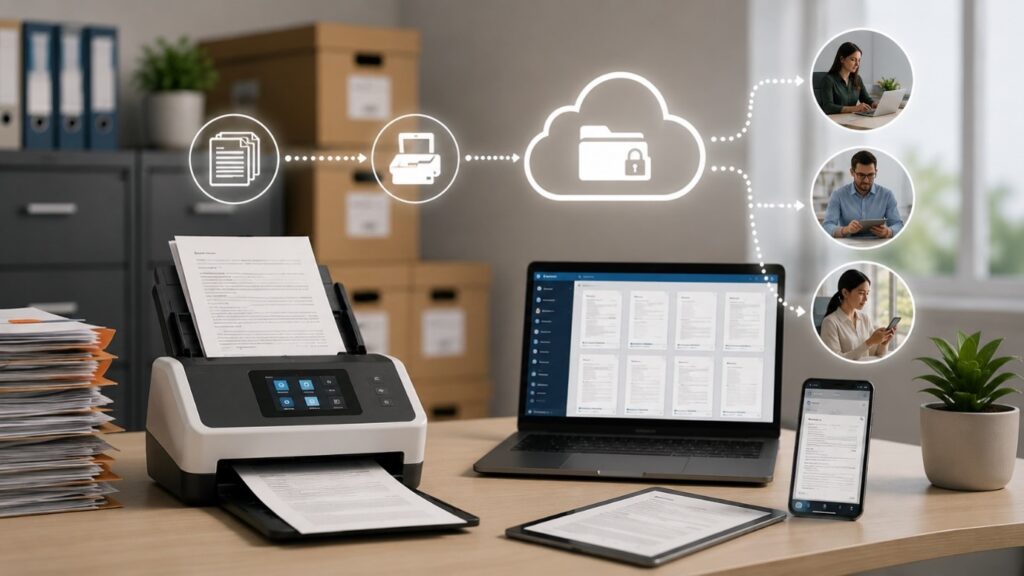
Retrieving a document takes seconds instead of a trip to the file room. Multiple staff members can access the same record at once, and remote or hybrid teams can pull up files from anywhere with an internet connection.
Offices also free up space once used for filing cabinets and cut the ongoing cost of offsite paper storage. Over time, these efficiency gains often make document digitization services pay for themselves.
6. How Legal Records Management Supports Better Casework
Strong legal records management does more than keep files tidy; it directly supports the pace of casework. Attorneys preparing for trial can pull every relevant document with a single keyword search.
Paralegals assemble exhibit binders faster when files are already indexed, and new associates get up to speed on a case without waiting for someone to dig up physical files. For firms juggling multiple active cases, this organization is often the difference between a comfortable deadline and a last-minute scramble.
7. How Medical Records Digitization Improves Patient Care
Medical records digitization has a direct impact on the quality and speed of patient care. When a physician can access a complete patient history in seconds, decisions get made faster and with more context. Referrals between specialists move more smoothly when records can be shared securely and instantly instead of being faxed or mailed.
Front desk staff spend less time searching for charts and more time with patients. And because digital records do not fade, tear, or get lost, practices gain a level of long-term reliability that paper charts simply cannot match.
8. What to Look for in a Document Digitization Partner
Choosing the right provider matters as much as the decision to digitize itself. Before signing a contract, ask the following questions.
- Does the provider offer HIPAA-compliant handling and sign a business associate agreement for medical projects?
- Is the scanning facility access controlled, monitored, and staffed by background-checked employees?
- Are files delivered with OCR and structured indexing, rather than as a folder of unsorted scans?
- Will original documents be securely destroyed with a certificate of destruction, or returned upon request?
- Is pricing clear about volume, format, and turnaround time, with no hidden fees added later?
A provider who answers these questions directly, with documented processes rather than vague assurances, is one worth trusting with case files and patient records. Industry experience matters too. A partner who understands litigation timelines and patient care will always handle your files better than a general vendor scanning paper on autopilot.
Conclusion: From Filing Cabinets to Fingertips
Every case file tells a client’s story. Every patient chart holds a piece of someone’s health history. These are not just documents; they are responsibilities, and how you store them says everything about how seriously you take that trust. The firms and practices that move on this now will spend the next decade retrieving records in seconds, while the ones that wait will still be digging through boxes.
Legal document scanning services and medical document scanning are not just an upgrade to how you store paper; they are an upgrade to how fast you can act, how well you stay compliant, and how confidently you can promise a client or a patient that their information is safe. The best time to make that shift was years ago. The next best time is now.
If you are ready to turn your file room into a searchable, secure digital archive, Access Scanning is ready to make that transition simple, secure, and built around exactly what your firm or practice needs.
Frequently Asked Questions
1. How long does a typical legal or medical scanning project take?
Timelines depend on volume and document condition, but most projects are completed within a few days to a couple of weeks, with rush turnaround available for urgent deadlines.
2. Can scanned legal documents still be used in court?
Yes. Properly scanned and indexed documents that accurately reproduce the original are generally accepted as valid evidence, though firms should confirm specific requirements with local court rules.
3. What happens to paper files after they are scanned?
Originals can be returned to your office, securely destroyed with certification, or stored offsite, depending on your firm or practice’s retention policy.
4. Is medical document scanning really HIPAA compliant, or just marketed that way?
A genuinely compliant provider signs a business associate agreement, uses encrypted transfer and storage, restricts access to trained staff, and can show you documented security procedures rather than just a claim on their website.
5. Can a small law office or single physician practice benefit from digitization, not just large firms?
Yes. Smaller offices often feel the impact even more, since a single missing file can consume an entire staff member’s morning. Scanning scales to the size of the practice, so even a modest project can free up real time and space.