Every business has files it cannot afford to lose or expose: client contracts, medical charts, tax records, HR paperwork. The moment those documents leave a locked cabinet and enter a scanning process, security becomes the only thing that matters. That is the whole idea behind secure document scanning services: turning paper into digital files without ever putting the information at risk along the way.
This guide covers what real security looks like during scanning, what to check before hiring a provider, and what has changed in the industry heading into 2026.
Why Security Has to Come First
Digitizing records is not just about convenience. A scanning project that skips security can do more damage than the paper clutter it was meant to solve. Files left unattended during pickup, weak storage systems, or staff who are not trained properly can all lead to leaked or lost information.
This is why secure document scanning has to be treated as a security project first and a digitization project second. The goal is not just fewer filing cabinets; it is documents that stay protected at every step, from pickup to final storage.
Many businesses only start thinking about this after something goes wrong: a misplaced file, a client asking where their records went, or a compliance audit that exposes gaps nobody noticed before. Building security into the process from day one avoids that scramble entirely.
What to Look for in a Scanning Partner
Not every provider handles your files the same way. Before signing with anyone, ask how they manage the entire chain of custody, not just the scanning itself. A provider that takes document security seriously should be able to explain:
- How documents are transported from your office to their facility
- Who has physical access to your files once they arrive
- What happens to the paper originals after scanning is complete
- How scanned files are stored, backed up, and protected against unauthorized access
A trustworthy partner will not hesitate to walk you through these details. If a company is vague about any part of this process, treat that as a warning sign rather than an inconvenience.
Confidential Records Need Extra Precautions
Some documents carry more risk than others. Legal case files, financial statements, and personnel records fall into a category where a single mistake can cause real harm to a client or the business itself.
Confidential document scanning for this kind of material usually involves locked scanning rooms, restricted staff access, and signed confidentiality agreements between the provider and your business. If your files include anything you would not want made public, ask specifically how the provider handles confidentiality, not just general security.
Law firms in particular deal with this daily. Case files often contain settlement details, client identities, and financial records that opposing parties or unauthorized staff should never see. A scanning partner familiar with legal work will already have procedures built around this kind of sensitivity, rather than treating every project the same way.
HIPAA Compliance for Healthcare Records
Medical practices, clinics, and hospitals face a stricter standard than most other industries. HIPAA compliant document scanning means the provider follows federal rules for handling protected health information, including secure transport, restricted access, and proper destruction of physical originals once scanning is verified.
Ask potential providers for proof of HIPAA compliance in writing, and confirm they sign a Business Associate Agreement before any patient records change hands. Skipping this step can create compliance problems that outlast the scanning project itself.
Encrypted Storage and Cloud Access
Once your documents are digital, storage becomes the next security checkpoint. Encrypted document storage protects files both while they are being transferred and while they sit in a database or cloud system. Look for providers that offer:
- End-to-end encryption during upload and storage
- Multi-factor authentication for anyone accessing the system
- Automatic backups so files cannot be permanently lost
- Detailed access logs showing who viewed or downloaded a file, and when
Cloud-based systems have become the standard choice for most businesses because they allow secure access from anywhere, which matters even more now that hybrid and remote teams are common rather than the exception.
Building a Secure Document Management System
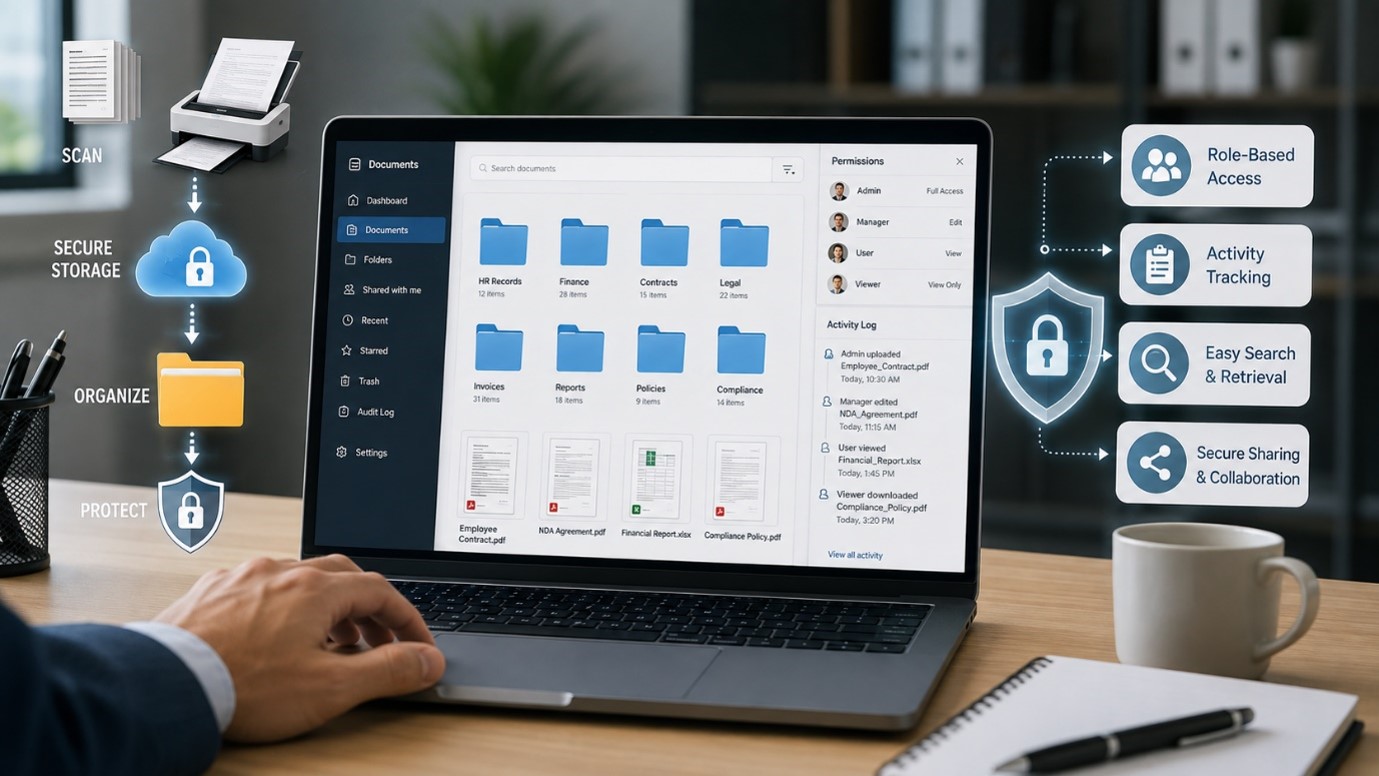
Scanning and storage are only part of the picture. A true secure document management setup also covers how files are organized, searched, and shared day-to-day. Strong systems support role-based permissions, so only the right people can open sensitive folders, and they track every action taken on a file.
This turns your digital archive into something you can actually trust, not just a folder full of scanned images sitting on a server.
What Happens Without Proper Security
Skipping security during a scanning project creates real consequences. Documents scanned in an unsecured office, stored without encryption, or handled by untrained staff are far more likely to be lost, copied without permission, or exposed in a breach. Sensitive document protection is not optional when the files involved include Social Security numbers, medical histories, or financial account details.
A breach involving this kind of information can lead to legal exposure, damaged client trust, and costs that far outweigh whatever was saved by choosing a cheaper, less careful provider.
Industry Trends Shaping Secure Scanning in 2026
AI-Assisted Document Classification
Providers are increasingly using AI to sort and flag sensitive documents automatically during scanning, reducing the chance that a confidential file gets mishandled or misfiled by a human reviewer.
Zero Trust Access Models
More scanning and storage platforms are adopting zero trust principles, meaning every access request is verified individually rather than assuming anyone inside the network can be trusted by default.
Stronger Audit Trail Requirements
Clients are asking for more detailed logs showing exactly who accessed a file, when, and from where, especially in legal, healthcare, and financial industries where accountability matters most.
Hybrid Cloud and On-Site Storage
Some businesses now split storage between cloud systems and secured on-site servers, giving them redundancy in case one system faces downtime or a security incident.
Automatic Retention and Destruction Policies
Modern systems increasingly build in rules that automatically flag or delete files once they pass a required retention period, reducing the risk of holding onto sensitive data longer than necessary.
Questions to Ask Before Hiring a Provider
- How are documents physically transported and tracked from pickup to scanning?
- What certifications or compliance standards does your facility maintain?
- Who has access to scanned files, and how is that access controlled?
- What happens to the paper originals once scanning is complete?
- Can you provide a sample audit log or access report from a past project?
A provider willing to answer these clearly is one that has likely already thought through the risks you are trying to avoid.
Common Mistakes Businesses Make
- Choosing a provider based on price without asking about security certifications
- Assuming all cloud storage is equally secure without checking encryption standards
- Forgetting to confirm how paper originals are destroyed after scanning
- Overlooking staff training as part of the provider’s overall security practice
- Failing to ask for a Business Associate Agreement when scanning medical records
Avoiding these missteps early prevents much bigger problems later, including compliance violations and data exposure. A short conversation with a potential provider about their security practices usually reveals more than a glossy sales pitch ever will.
Conclusion
Protecting sensitive paperwork takes more than good intentions. It requires a scanning partner who treats security as a priority at every step, from pickup and handling to encrypted storage and long-term access control. At Access Scanning, that level of care is built into every project we take on.
Reach out today to find out how a secure, compliant scanning process can protect your records and give your business real peace of mind.
Frequently Asked Questions
1. What makes document scanning secure?
Secure document scanning can be defined as controlled transfer, limited access to the premises, encryption of the documents, and safe destruction of the original documents.
2. Are secure document scanning services worth it for small businesses?
Yes. The benefits of secure document scanning services to small businesses are as great as those to large companies since the latter will spend less on securing against threats rather than fixing them.
3. What is required for HIPAA-compliant document scanning?
HIPAA-compliant document scanning will require that a Business Associate Agreement is signed, restricted access to patient records, and the destruction of originals after digitization verification.
4. How is encrypted document storage different from regular cloud storage?
Encrypted document storage makes sure that file data is scrambled such that no one can view it without the necessary permission, whereas normal storage does not necessarily provide such security.
5. Why does document security matter for confidential records?
Document security ensures that confidential documents remain free from being leaked, stolen, or misused, as such documents pose a great threat if they get out.