To organize scanned documents for fast retrieval, use a simple folder structure, apply consistent file names with dates and key details, run OCR so text is searchable, and add a few index fields. Review the system regularly so it stays consistent as files grow.
Scanning turns paper into files, but it does not automatically turn those files into an organized archive. A folder of PDFs named Scan001 through Scan900 is easier to carry than a filing cabinet, yet just as hard to search. Strong digital file organization fixes that by giving every file a predictable home, a clear name, and the details people actually search by. This guide covers folder structure, document naming conventions, OCR, and indexing, along with file name examples and a simple routine for keeping everything easy to find.
Key Takeaways
- Build folders around how your team looks for files, and keep them shallow.
- Name every file the same way, using a date, an ID, or both.
- Run OCR so the text inside each file can be searched.
- Index only the fields people actually use.
- Assign an owner and review the system on a schedule.
Why Scanned Files Become Hard to Find
Most retrieval problems come from a few habits: files named by whoever happened to scan them, folders that grew without a plan, and image-only PDFs that cannot be searched by content. These issues are easy to overlook while the archive is small, but they multiply with every box, every employee, and every year of records, until finding one file takes effort.
People then fall back on asking a colleague, which does not scale. Time lost to searching adds up quickly, especially when the person who knew where everything lived is away. A short set of shared rules removes most of these problems.
A Step-by-Step Plan to Organize Scanned Documents
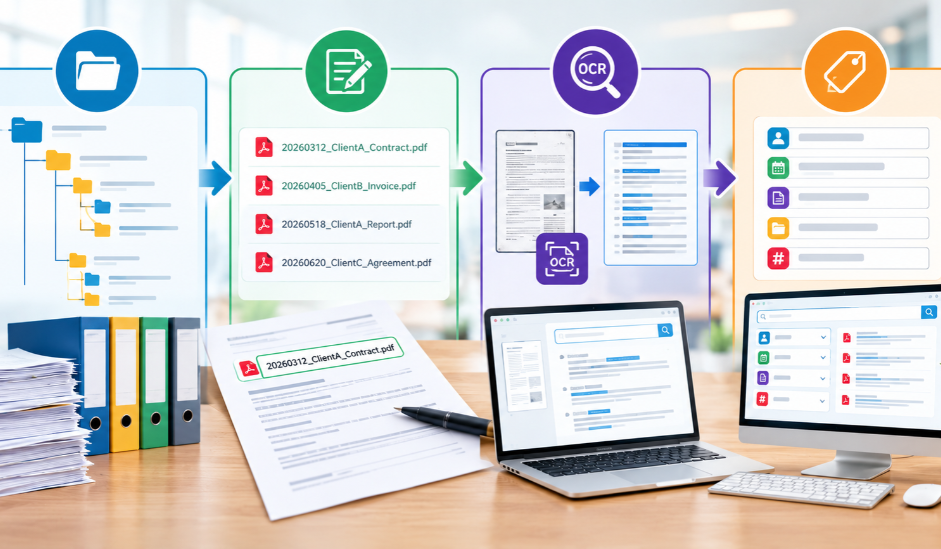
Complete these steps in order, ideally before a large batch of scans arrives, so every new file has a place from day one and nobody has to sort a backlog later.
Step 1: Build a Simple Folder Structure
Group files the way your team already looks for them, such as by client, department, or year. Keep the structure shallow, ideally three or four levels, and use the same top-level folders everywhere.
Step 2: Apply Document Naming Conventions
Name files by what they contain. Where the date matters, write it as YYYYMMDD, such as 20260312, so files sort in date order. Use underscores, skip special characters, and write the pattern down.
Step 3: Make Files Searchable With OCR
Scanning creates an image of each page. Optical character recognition, or OCR, reads that image and adds a text layer, turning plain scans into searchable documents, so you can find files by any word inside.
Step 4: Add Index Fields
Index fields are details attached to each file, such as client name, case number, or document type. They let people filter results instead of guessing names. Choose three to five fields you will truly use.
File Name Examples for Common Document Types
Use these examples as a starting point, then adjust the pattern to match your records. Keep the details in the same order in every name so similar files group together.
Each name combines the details people search for, so a results list shows what every file is at a glance.
| Document Type | Example File Name | What It Tells You |
| Invoice | 20260312_AcmeSupply_Invoice_4821.pdf | Date, vendor, type, number |
| Contract | 20260105_RiveraLLC_Lease_v02.pdf | Date, party, type, version |
| Medical record | 100482_Intake_20260214.pdf | Patient ID, type, date |
| Legal filing | 20260220_Case2291_Motion_v01.pdf | Date, case, type, version |
For records with private details, such as patient charts, use an ID number instead of a full name in the file name, and keep the list that links IDs to names in a secure place.
Keep Scanned Document Management Simple Over Time
A system only works if people keep using it. A little regular upkeep prevents the slow drift that turns a tidy system back into a pile of mismatched names. These habits protect the work you have done:
- Write a one-page guide covering folder rules, the naming pattern, and index fields.
- Assign one owner who answers questions and approves changes.
- Spot check a small sample of new files each month for naming errors.
- Set access by role so staff see only what they need.
- Keep a backup copy in a second location, and confirm that you can restore from it.
Conclusion
The best way to organize scanned documents is to decide on the rules before the files pile up: a shallow folder structure, one naming pattern, OCR on every file, and a short list of index fields. Consistent digital file organization matters more than a perfect design, because a plain system that everyone follows will usually beat a clever one that people ignore. Review it every few months and adjust as your records grow.
If you are planning a scanning project, settle your naming pattern and index fields first. Access Scanning offers PDF with OCR and can follow the file names and folders your team already uses, so finished files fit into your system from the start.
FAQs
Should I scan to PDF or TIFF?
PDF is the usual choice because it opens almost anywhere and supports searchable text. TIFF is often kept as an archival master. Ask for both if you need a preservation copy.
Can I rename scanned files in bulk?
Yes. Many file managers and document systems support batch renaming, and some can build names from index fields. Test on a small batch first so any mistakes are easy to undo.
Do I need document management software?
Not always. Small collections work well with shared folders and a clear naming pattern. Software helps when many people need version control, permissions, and index-based search across thousands of files.
How do I fix scans that already have messy names?
Start with the most used folders, apply your new naming pattern, and rename the rest in batches. Keep a short note of the old pattern so nothing gets lost during the change.
Do I need to index every file?
No. Index fields help most with records people search often, such as invoices, cases, or patient charts. Low-use archives may only need clear names and OCR to stay easy to find.
Turn Your Paper Files Into an Organized Archive
Contact our team to discuss your files, naming rules, and index fields. We will help you plan a scan that fits your workflow from the first page.